Key takeaways
- Looking for the best wireless Cherry MX Brown keyboards? Compare genuine MX Brown boards, wireless modes, battery life, and layouts to find a quiet tactile fit.
The best wireless cherry mix brown keyboards pair the quiet tactile bump of Cherry MX Brown switches with cable-free freedom, and that combination is harder to find than most shoppers expect. Many wireless mechanical keyboards use Brown-style switches from other makers, while only a small group ships with genuine Cherry MX Brown or the newer MX2A Brown switches fitted at the factory. This guide sorts the genuine Cherry boards from the Brown-like alternatives, explains how Bluetooth and 2.4 GHz wireless differ in daily use, and compares layouts, battery designs, and build quality so you can choose with confidence.
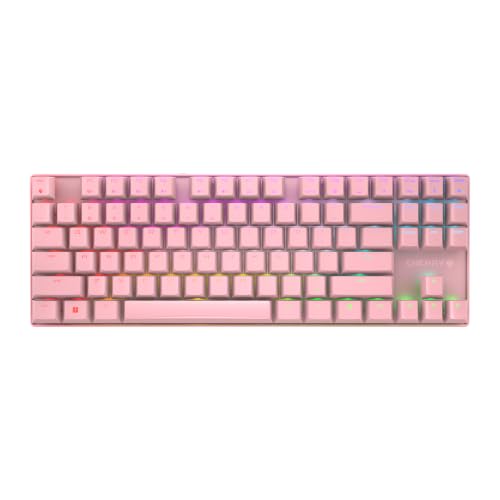
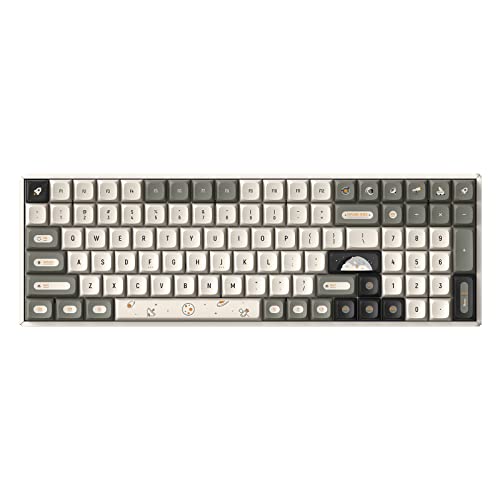
Quick answer: if genuine Cherry MX Brown switches are the priority, start with the CHERRY MX 8.2 TKL Wireless for a compact tenkeyless board, the IQUNIX F97 Hitchhiker for a near full-size layout with a number pad, or the Leopold FC630MBT for a small 60 percent board. If you value hot-swappable sockets and programmable firmware more than the Cherry name on the switch, the Keychron K8 Pro is a strong Brown-feel alternative, with the clear caveat that its factory switches are Gateron G Pro Brown switches, not genuine Cherry switches.
Quick Picks
Our Short List of 3
All 4 Picks at a Glance
| Product | Specs | Action |
|---|---|---|
| CHERRY MX 8.2 TKL Wireless | Check price on Amazon | |
| IQUNIX F97 Hitchhiker | Check price on Amazon | |
 Leopold FC630MBT Blue/Grey | Check price on Amazon | |
 Keychron K8 Pro | Check price on Amazon |
How to Choose
Genuine Cherry MX Brown Versus Brown-Like Switches
The first decision is also the most important one for this keyword. Genuine Cherry MX Brown switches are made by Cherry, with a tactile bump you can feel partway through the keypress and no click sound. The newer MX2A Brown generation keeps that same tactile character while refining the travel for a smoother, more consistent press. Brown-like switches from Gateron, Kailh, and other makers aim for the same feel, but they are not Cherry switches. A listing that says only “Brown switch” without naming Cherry may be using a clone. Before you buy, check the switch field for the words Cherry MX Brown or Cherry MX2A Brown, and confirm that Brown is the selected variant.
Wireless Modes: Bluetooth, 2.4 GHz, and Wired Backup
Most boards in this guide offer more than one way to connect. Bluetooth is the flexible choice for laptops, tablets, and phones, and it usually lets you pair with up to three devices and switch between them with a key combination. A 2.4 GHz dongle connection is the better choice for gaming and fast typing, because it generally responds more quickly and holds a steadier connection than Bluetooth. A wired USB-C connection is the fallback that keeps you typing while the battery charges and removes wireless lag entirely. Every keyboard in this guide also works wired, so a dead battery never has to end your workday.
Battery Design and Realistic Battery Life
Battery claims vary widely because backlighting changes everything. A board can last for weeks with the backlight off and only days with bright RGB lighting on. Rechargeable lithium-polymer batteries, common in the CHERRY, IQUNIX, and Keychron boards here, charge over USB-C and are convenient for daily desk use. The Leopold FC630MBT takes a different approach, running its Bluetooth connection on three AAA batteries, which some buyers prefer because there is no built-in battery to wear out over time. When you compare battery claims, look for the conditions behind them, such as backlight off or lowest brightness, and expect much shorter life with RGB lighting at full brightness.
Layout: Tenkeyless, 96 Percent, or 60 Percent
Layout shapes how the board fits your desk and your work. Tenkeyless boards drop the number pad but keep the function row, arrow keys, and navigation cluster, which suits most typists and gamers and frees up space for the mouse. A 96 percent board like the IQUNIX F97 keeps the number pad in a compact frame by removing the gaps between key groups, which suits spreadsheet work and data entry. A 60 percent board like the Leopold FC630MBT drops the function row, arrow keys, and number pad entirely, which suits small desks and travel, but it means reaching number and function keys through a function layer.
Build Quality, Keycaps, and Sound
Cherry MX Brown switches give you the tactile feel, but the case and keycaps shape the sound and the typing experience around them. Aluminum cases, found on the CHERRY and IQUNIX boards, feel solid and resist flex, while plastic cases keep weight and cost down. Double-shot PBT keycaps resist shine and wear better than thin ABS keycaps, and they usually feel more textured under the fingers. Sound-dampening foam and silicone layers inside the case can soften the sound of each keypress, which matters in a shared office.
Hot-Swappable Sockets and Programmability
Some keyboards let you pull switches out and press new ones in without soldering. That feature, called hot-swapping, is useful if you want to try a different switch later or replace a single faulty switch. The IQUNIX F97 and the Keychron K8 Pro both offer hot-swappable sockets, while the CHERRY MX 8.2 TKL Wireless and the Leopold FC630MBT do not, so their switches are fixed. Programmability matters too. The Keychron K8 Pro supports QMK and VIA firmware, which lets you remap keys and build layers and macros. The CHERRY board uses its own utility software for programming and lighting, while the Leopold takes a simpler approach with dip switches for layout changes and no heavy software.
Backlighting, Compatibility, and Extras
Backlighting ranges from single-color white LEDs to full per-key RGB lighting. RGB lighting looks lively on a gaming desk but drains the battery faster and adds cost. Check operating system compatibility as well. The boards in this guide work with Windows and macOS, and several also support iOS and Android over Bluetooth. Extra details worth noting include a metal carrying case with the CHERRY board, a dust cover and spare keycaps with the IQUNIX board, and Mac and Windows keycaps included with the Keychron.
The Best Best Wireless Cherry Mix Brown Keyboards Reviewed
CHERRY MX 8.2 TKL Wireless
The CHERRY MX 8.2 TKL Wireless is the most direct answer to this keyword: a wireless keyboard from Cherry itself, fitted with genuine Cherry MX2A Brown switches. The tenkeyless layout keeps 87 keys, including the function row and navigation cluster, while dropping the number pad for a smaller desk footprint. The aluminum housing gives the board a solid, planted feel, and a metal carrying case is included.
Connectivity covers all three modes: Bluetooth, a 2.4 GHz dongle for low-latency gaming, and a wired USB-C connection. Cherry describes the gaming mode latency as under one millisecond, which is the mode to use for fast-paced games. The RGB backlighting is adjustable per key, and the board supports full n-key rollover and anti-ghosting, so simultaneous keypresses register correctly. The switches are rated for more than 100 million keystrokes, and the tactile Brown feel is the quiet middle ground in the Cherry range: a noticeable bump at actuation without the click of a Blue switch or the smooth, bump-free travel of a Red switch.
There are trade-offs to weigh. The switches are not hot-swappable, so the Brown switches you buy are the switches you keep. The customization software is functional but less polished than the open firmware on some rival boards. None of that changes the core appeal: if you want genuine Cherry MX2A Brown switches in a wireless tenkeyless board from the company that makes the switches, this is the natural first pick.
IQUNIX F97 Hitchhiker
The IQUNIX F97 Hitchhiker is the pick for buyers who want genuine Cherry MX Brown switches and refuse to give up the number pad. Its 96 percent layout fits 100 keys into a frame only slightly wider than a tenkeyless board, keeping the number pad, function row, and arrow keys while removing the empty space between key groups. The aluminum case gives the board a reassuring weight, and the dye-sublimated PBT keycaps resist wear and shine.
The F97 connects by Bluetooth 5.1, 2.4 GHz wireless, or USB-C wired, and it pairs with up to three Bluetooth devices. The 4000 mAh battery is one of the larger capacities in this guide, and the maker describes battery life of up to 260 days over Bluetooth with the backlight off, based on eight hours of daily use. With backlighting on, expect far less, as with every RGB board. The hot-swappable PCB is a genuine advantage: you can pull the Cherry MX Brown switches out and fit other MX-style switches later without soldering, which keeps the board flexible if your taste changes.
The Hitchhiker design is a space-themed colorway with a distinctive look, so it suits a desk where personality is welcome and may not suit a plain office setup. The board is also heavier than the tenkeyless options here, which is good for stability and less good for travel. Choose the Cherry MX Brown variant carefully on the listing, because the F97 is also sold with Cherry MX Red, Blue, and Pink switches and with TTC switches, and the wrong variant changes the typing feel entirely.
Leopold FC630MBT Blue/Grey
The Leopold FC630MBT Blue/Grey is the compact pick in this guide, a 60 percent Bluetooth keyboard with genuine Cherry MX2A Brown switches. It has 61 keys and no function row, number pad, or dedicated arrow keys, so it takes up very little desk space and travels well. The double-shot PBT keycaps are thick and durable, and the internal sound-absorbing pads give the board a quieter, softer typing sound than many small boards.
Wireless connectivity is Bluetooth 5.1, with a USB-C wired connection as the alternative. There is no 2.4 GHz dongle mode, so this is a Bluetooth-first board rather than a gaming-first board. Bluetooth runs on three AAA batteries instead of a rechargeable pack, which means you can swap in fresh batteries in seconds and never wait for a charge, though you will need to keep spares on hand. The board supports Windows and Mac layouts through dip switches.
The 60 percent layout is the main thing to think about before buying. Everyday keys like arrows and function keys live on a function layer, which takes time to learn and slows some workflows. The board is not hot-swappable, and it has no 2.4 GHz mode for low-latency gaming. For a small desk, a travel bag, or a quiet typing setup where space matters more than a full key set, those trade-offs are reasonable.
Keychron K8 Pro
The Keychron K8 Pro is included here as a clearly flagged Brown-feel alternative, not as a genuine Cherry board. Its factory switches are Gateron G Pro Brown switches, which are Brown-like tactile switches made by Gateron, not Cherry MX Brown switches. The feel is close: a gentle tactile bump without a click, with an operating force around 55 grams and a two-millimeter pre-travel. If the Cherry name on the switch matters to you, choose one of the three boards above instead. If the feel and the features matter more than the switch maker, the K8 Pro earns its place.
What the K8 Pro offers is flexibility. The hot-swappable PCB accepts most three-pin and five-pin MX-style switches, including genuine Cherry switches, so you can fit Cherry MX Brown switches later if you want them. QMK and VIA support lets you remap keys, build layers, and create macros, which is more freedom than the fixed boards in this guide offer. Bluetooth 5.1 pairs with up to three devices, and a USB-C wired mode covers charging and wired use. The 4000 mAh battery is rated for up to 100 hours of typing at the lowest backlight brightness, with much longer life when the backlight is off.
The tenkeyless layout, double-shot PBT keycaps, aluminum frame on the RGB version, and included Mac and Windows keycaps make it a practical daily board for both operating systems. Note that the black fully assembled version is not hot-swappable and omits some of the sound-dampening material found in the hot-swappable version, so check the version before you buy.
What to Check Before You Buy
Before you order, confirm five details on the listing page. First, check the switch field and the selected variant: it should read Cherry MX Brown or Cherry MX2A Brown, not simply Brown, and not Red, Blue, or Black. Second, confirm the wireless modes you need are present: Bluetooth alone is fine for typing and office work, while a 2.4 GHz dongle mode is worth having for gaming. Third, check the layout against your daily keys, especially the number pad, function row, and arrow keys, since compact boards hide some of them behind a function layer. Fourth, look at the battery design and the conditions behind any battery-life claim. Fifth, check whether the board is hot-swappable if you want to change switches later. A few minutes on these checks prevents the most common disappointment with this keyword: receiving a wireless Brown-feel keyboard that does not have genuine Cherry MX Brown switches inside.
FAQ
What does Cherry MX Brown feel like?
Cherry MX Brown is a tactile switch with a small bump you can feel partway through each keypress, followed by smooth travel to the bottom of the key. It has no click sound, so it is quieter than Cherry MX Blue and more communicative than the smooth, linear Cherry MX Red. The actuation force is around 45 grams, with actuation at two millimeters of travel and a total travel of four millimeters. The newer MX2A Brown keeps the same tactile character with smoother travel and more consistent feel from key to key.### Are Cherry MX Brown keyboards good for gaming and typing?
Yes, Cherry MX Brown is the middle-ground switch that suits both uses. The tactile bump helps typists feel when a key has registered, which can reduce typing errors over long sessions. For gaming, the bump gives feedback without the noise of a clicky switch, and the two-millimeter actuation point is quick enough for most games.
Is Bluetooth or 2.4 GHz better for a wireless keyboard?
Bluetooth is better for flexibility: it connects to laptops, tablets, and phones, and pairs with several devices at once. A 2.4 GHz dongle connection is better for speed and stability: it usually responds faster and holds a steadier link, which matters in fast-paced games. Many boards in this guide offer both, so you can use Bluetooth for a tablet and the dongle for a gaming PC. If a board offers only Bluetooth, it is still fine for typing and office work, but it is not the best choice for competitive gaming.
How long does the battery last on a wireless Cherry MX Brown keyboard?
It depends mostly on backlighting. With the backlight off, many of these boards last for weeks or months of normal use. With bright RGB lighting on, battery life drops to days rather than weeks. Rechargeable boards charge over USB-C and can keep working while plugged in, while the Leopold in this guide runs on replaceable AAA batteries.
Can I replace the switches on a wireless Cherry MX Brown keyboard?
It depends on the board. The IQUNIX F97 Hitchhiker and the hot-swappable version of the Keychron K8 Pro have hot-swappable sockets, so you can pull switches out and press new MX-style switches in without soldering. The CHERRY MX 8.2 TKL Wireless and the Leopold FC630MBT do not offer hot-swapping, so their switches are soldered in place and changing them is a repair job rather than a simple swap. If you think your switch preference may change, choose a hot-swappable board from the start.
Bottom Line
The best wireless cherry mix brown keyboards are a small group, and the genuine Cherry boards stand apart from the Brown-like alternatives once you know what to look for. The CHERRY MX 8.2 TKL Wireless is the cleanest pick for most buyers: genuine Cherry MX2A Brown switches, three connection modes, and a solid aluminum tenkeyless body. The IQUNIX F97 Hitchhiker is the pick if you need a number pad and a hot-swappable board without giving up genuine Cherry MX Brown switches. The Leopold FC630MBT is the pick for a small desk and quiet typing, with genuine MX2A Brown switches in a compact 60 percent frame. The Keychron K8 Pro is the pick for customization, with hot-swappable sockets and QMK/VIA programming, as long as you accept that its factory switches are Gateron G Pro Brown switches rather than genuine Cherry. Confirm the Brown variant on the listing before you order.
Disclosure: As an Amazon Associate, we may earn from qualifying purchases.