Key takeaways
- The best student laptops Google fans will love: Chromebooks built for Google Workspace, Docs, Drive and Classroom, with long battery life and student-friendly prices.
Introduction
For a student whose coursework lives in Google Docs, Google Drive, Gmail, and Google Classroom, the laptop that fits best is often the one built around Google itself. The best student laptops Google offers through its ChromeOS ecosystem are Chromebooks: fast-booting, secure, cloud-first laptops that run Google Workspace natively and keep going all day on a single charge. They are also some of the most affordable laptops a student can buy, which matters when tuition, textbooks, and rent already compete for the same budget.
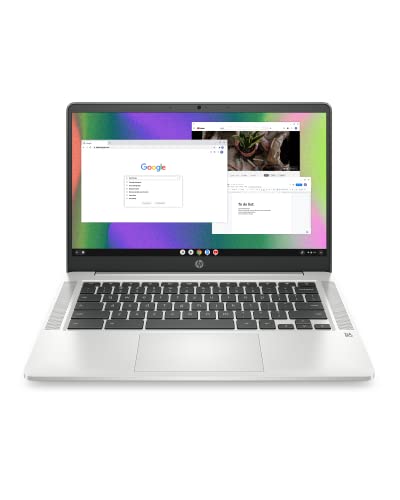

This guide looks at three Chromebooks that suit student life in different ways. The Lenovo IdeaPad Slim 3 Chromebook is the all-rounder, with a sharp touchscreen and a modern eight-core processor. The HP Chromebook 14 is the endurance pick, with battery life rated for the longest days on campus. The Acer Chromebook Spin 311 is the compact convertible, a small 2-in-1 that folds into a tablet for handwritten notes and reading. All three run ChromeOS, which means automatic updates, built-in virus protection, and instant access to Google Workspace and the Google Play Store. The sections below explain what to look for in a student Chromebook, review each machine in detail, and help match one to the way you actually study.
At a Glance
| Product | Best for | Key spec |
|---|---|---|
| Lenovo IdeaPad Slim 3 Chromebook | Everyday all-rounder | 14-inch FHD touchscreen, MediaTek Kompanio 520 |
| HP Chromebook 14 | Long days away from an outlet | 14-inch HD display, Celeron N4120, up to 14-hour battery |
| Acer Chromebook Spin 311 R725T | Notes and portability | 11.6-inch HD touchscreen convertible, 8GB RAM |
How to Choose a Student Laptop for Google Services
Start with the operating system and the ecosystem it serves. A Chromebook runs ChromeOS, Google’s own system, so Google Docs, Sheets, Slides, Drive, Meet, and Classroom run natively in the browser with nothing to install and nothing to keep updated by hand. Files save to Google Drive automatically, which means a lost or damaged laptop does not mean lost coursework. Android apps from the Google Play Store add tools such as note-taking apps, PDF readers, and media apps, while Linux support on many models covers the occasional coding assignment. If a course requires Windows-only or Mac-only software, check with the department first, because that is the one situation where a Chromebook may not be the right tool.
Screen size and weight decide how the laptop feels in daily use. A 14-inch display is the sweet spot for most students: large enough for split-screen research and writing, small enough to carry in a backpack without strain. An 11.6-inch convertible is lighter and easier to use in cramped lecture halls, but the smaller screen means more scrolling and less room for side-by-side windows. A touchscreen adds real value for students who annotate PDFs, sketch diagrams, or prefer tapping through slides, and it is worth having if the budget allows.
Memory and storage matter more than they appear on a spec sheet. Four gigabytes of RAM handles documents, email, streaming, and a dozen browser tabs at once, which covers most coursework, but 8GB gives noticeably more headroom for students who keep many tabs and apps open during research. Storage on a Chromebook is usually 64GB of eMMC flash, which is modest by Windows laptop standards but adequate when documents live in Google Drive and media streams rather than downloads. A microSD card slot is a useful safety valve for extra files and offline media.
Battery life is the spec that shapes the student day. A Chromebook rated for 10 hours or more can survive lectures, the library, and a study group without hunting for an outlet, and fast charging makes a short break between classes enough to top up meaningfully. Weight matters alongside battery: a machine under three pounds disappears into a backpack, while a heavier one is felt by the end of the day.
Finally, check the automatic update expiration date. Google publishes an end-of-support date for every Chromebook model, after which the device stops receiving ChromeOS updates. A model with updates guaranteed into the next decade will serve a full degree program, while a model nearing its end date is a poor buy even at a low price. The Lenovo IdeaPad Slim 3 in this guide, for example, is listed with ChromeOS updates through June 2031.
Lenovo IdeaPad Slim 3 Chromebook
ASIN: B0G49YP7K2
The Lenovo IdeaPad Slim 3 Chromebook is the best all-round pick in this group, because it balances the features students use most without an obvious weakness. Its 14-inch Full HD IPS touchscreen displays text and video clearly at 1920 by 1080 resolution, with an anti-glare finish that keeps the screen readable under classroom lighting. The 16:10 aspect ratio on some configurations gives extra vertical room for documents and web pages, which is a small detail that matters when reading long articles.
Under the hood is a MediaTek Kompanio 520 octa-core processor, paired with 4GB of LPDDR4X memory and 64GB of eMMC storage, plus a microSD card slot for expansion. The listing ships as a bundle that adds a 256GB microSD card and a docking station set to the base machine, so it is worth reading the listing to confirm exactly what is included. The Kompanio 520 keeps a dozen browser tabs, a Google Docs session, and a streaming video moving at once, which is the realistic shape of a study session. Wi-Fi 6 keeps the connection fast on crowded campus networks, and the 720p camera includes a privacy shutter for video calls.
Portability is a genuine strength: the Slim 3 weighs just 2.87 pounds in a slim abyss blue chassis, and the 14-inch body still fits easily in a standard backpack sleeve. Battery life is rated for a full day of classes, and the touchscreen makes the machine equally comfortable for typing an essay, tapping through slides, or marking up a PDF with a stylus. ChromeOS updates are listed through June 2031, which covers a full undergraduate program with room to spare.
This Chromebook is best for the student who wants one machine for everything: lectures, essays, research, streaming, and video calls, in a light body with a screen that is pleasant to look at for hours. Its limitations are the 4GB of memory, which can feel tight with very heavy tab use, and 64GB of built-in storage, which relies on Google Drive and the bundled card for anything beyond the basics.
Pros:
– Sharp 14-inch Full HD IPS touchscreen with anti-glare finish
– MediaTek Kompanio 520 octa-core processor for smooth multitasking
– Light at 2.87 pounds, easy to carry all day
– Wi-Fi 6 and a privacy-shutter webcam for campus life
– ChromeOS updates listed through June 2031
Cons:
– 4GB of RAM limits very heavy multitasking
– 64GB of eMMC storage relies on cloud storage and the bundled card
– Bundle contents vary, so the listing needs a careful read
HP Chromebook 14
ASIN: B09SVSBVP1
The HP Chromebook 14 is the endurance pick, built for the student whose day runs from an early lecture to a late library session without a guaranteed outlet. Its headline feature is battery life rated at up to 14 hours, with fast-charge support that restores about half a charge in roughly 45 minutes, so even a short break between classes puts meaningful power back in the machine.
The hardware is straightforward and proven. An Intel Celeron N4120 quad-core processor, running at up to 2.6 GHz, pairs with 4GB of DDR4 memory and 64GB of eMMC storage, with Intel UHD Graphics 600 handling streaming and video calls. The 14-inch HD display measures 1366 by 768 pixels with a micro-edge, anti-glare finish that reduces eye strain during long reading sessions. The mineral silver chassis weighs about 3.2 pounds and measures roughly 12.8 by 8.6 by 0.7 inches, slim enough for a backpack and sturdy enough for daily transport.
ChromeOS is the same fast, secure system as on the other machines here, with automatic updates and Google Play apps, and this model is listed with automatic updates through June 2027. Connectivity includes Wi-Fi and Bluetooth, USB-A and USB-C ports, an HDMI output for a dorm-room monitor or a classroom projector, and a headphone jack. The keyboard is a full-size Chromebook layout with a quiet, shallow action that suits long typing sessions, and the trackpad is large enough for comfortable navigation without a mouse.
This Chromebook is best for students who spend long days on campus and value battery life above all else, and for anyone who wants a simple, reliable machine for documents, browsing, and streaming. Its limitations are the HD resolution, which is less sharp than the Full HD panel on the Lenovo, and the 2027 update expiration, which is shorter than the Lenovo’s and worth weighing if the laptop is meant to last a full degree.
Pros:
– Battery life rated up to 14 hours for all-day campus use
– Fast charging restores about half a charge in roughly 45 minutes
– Light 3.2-pound design with a slim mineral silver chassis
– HDMI output for an external monitor or projector
– Anti-glare display that is comfortable for long reading sessions
Cons:
– HD 1366 by 768 display is less sharp than Full HD panels
– ChromeOS updates listed through June 2027, shorter than rivals
– 4GB of RAM and 64GB of storage are entry-level figures
Acer Chromebook Spin 311 R725T
ASIN: B0H1BTRWFB
The Acer Chromebook Spin 311 R725T is the convertible of this group, and the pick for students who take notes by hand, read on the move, or simply want the smallest laptop that still does real work. Its 11.6-inch HD IPS touchscreen folds a full 360 degrees, so the machine works as a laptop for typing, a tent for watching lectures, and a tablet for handwritten notes and reading. The screen measures 1366 by 768 pixels, and the compact body weighs about 2.78 pounds, making it the lightest machine in this guide.
This configuration pairs a MediaTek MT8 series octa-core processor with 8GB of memory and 64GB of eMMC storage, which makes it the only machine here with 8GB of RAM. That extra memory is the Spin 311’s quiet advantage: it keeps more tabs and apps open without slowing down, which matters during research sessions that span a dozen sources. Acer designs the Spin 311 for education, with a durable chassis that meets MIL-STD 810H military-standard toughness testing, a serviceable keyboard, and Wi-Fi 6 or Wi-Fi 7 connectivity depending on configuration. Battery life is positioned for a full school day, and the touchscreen supports stylus input for annotation.
The trade-off is screen size. An 11.6-inch display is excellent for portability and note-taking but cramped for split-screen work, and the HD resolution shows its limits next to a Full HD panel. The small keyboard is also tighter than a 14-inch machine’s, though it remains usable for essays and assignments. Students should confirm the exact model number before ordering, since Acer sells the Spin 311 in several configurations, and the R725T-84ZN is the 8GB version covered here.
This Chromebook is best for younger students, note-takers, and anyone who prioritizes portability and durability over screen size, and for students who want a tablet and a laptop in a single device. Its limitations are the small HD screen, the compact keyboard, and the modest 64GB of storage.
Pros:
– 360-degree convertible design works as laptop, tent, and tablet
– 8GB of RAM, the most memory of the three machines here
– Light at about 2.78 pounds with a durable MIL-STD 810H chassis
– Touchscreen supports stylus input for handwritten notes
– Designed for education, with a serviceable keyboard and ports
Cons:
– 11.6-inch HD screen is cramped for split-screen research
– Compact keyboard is tighter than a 14-inch laptop’s
– 64GB of storage relies on Google Drive for larger files
Which One Fits You
The right Chromebook depends on how the student day actually looks. The Lenovo IdeaPad Slim 3 is the best choice for most students: a 14-inch Full HD touchscreen, a modern processor, a light body, and updates through June 2031 cover lectures, essays, research, and streaming without compromise. The HP Chromebook 14 is the pick for the student whose days are longest, because its battery life rated up to 14 hours and fast charging mean the charger can stay in the dorm room. The Acer Chromebook Spin 311 is the pick for the note-taker and the commuter: the smallest and lightest machine here, with a convertible touchscreen and 8GB of memory, at the cost of a smaller screen.
Students who live in Google Docs and Google Drive will be at home on any of the three, since ChromeOS treats Google Workspace as the native environment rather than an add-on. The deciding factors are screen size, battery life, and whether a touchscreen and convertible hinge matter for the way notes are taken. For a first Chromebook, the Lenovo is the safest all-round answer. For a second machine or a younger student, the Acer’s durability and size are hard to beat.
FAQ
Is a Chromebook enough for university coursework?
For most courses, yes. Google Docs, Sheets, Slides, Drive, Meet, and Classroom run natively on ChromeOS, and the Google Play Store adds note-taking, PDF, and media apps. Check with the department first if a course requires Windows-only or Mac-only software.
What does “Google” mean in a student laptop search?
It usually means a laptop built for Google services: a Chromebook running ChromeOS, with Google Workspace, Google Drive, and Google Classroom at the center of the experience. All three laptops in this guide are Chromebooks in that sense.
How much RAM does a student Chromebook need?
Four gigabytes covers documents, email, streaming, and a dozen browser tabs, which is most coursework. Eight gigabytes, as on the Acer Spin 311 here, gives more headroom for research sessions with many tabs and apps open at once.
Is 64GB of storage enough on a Chromebook?
Yes for most students, because documents, photos, and coursework live in Google Drive rather than on the device, and media usually streams. A microSD card slot provides extra room for files and offline media when needed.
How long will a Chromebook keep getting updates?
Google publishes an automatic update expiration date for every model. The Lenovo IdeaPad Slim 3 in this guide is listed through June 2031, while the HP Chromebook 14 is listed through June 2027. Check the date before buying, and prefer a model with years of updates remaining.
Can a Chromebook run Microsoft Office?
Microsoft 365 apps are available on ChromeOS through the web and the Google Play Store, and Google Docs can open and export Word, Excel, and PowerPoint files. Students who need the full desktop Office suite should confirm their course requirements first.
Conclusion
A student laptop built around Google is a Chromebook, and the three in this guide cover the main ways students actually work. The Lenovo IdeaPad Slim 3 Chromebook is the best all-rounder, with a sharp touchscreen and updates that outlast a degree. The HP Chromebook 14 is the endurance machine, with battery life rated for the longest campus days. The Acer Chromebook Spin 311 is the compact convertible, light and durable, with 8GB of memory for serious multitasking. Pick the one that matches the way you study, and the Google ecosystem will take care of the rest.
Disclosure: As an Amazon Associate, we earn from qualifying purchases.