Key takeaways
- Compare the best 4GB graphics cards under 200 for 1080p gaming, small cases, and older PCs, with specs, fit, and what to check before buying.
A 4GB graphics card purchase at this budget is really a decision about what you are willing to give up. Four gigabytes of video memory can still carry 1080p gaming at sensible settings, a smoother desktop, and hardware video output for a second monitor, yet it will not carry every new release at high texture settings. The buyer who gets this right knows the games they actually play, the resolution of the monitor they already own, and the power supply sitting inside the case before ordering anything.
This guide is for three groups in particular: owners of older office or prebuilt desktops who want a first dedicated card without changing the power supply, small-case builders who need a short, single-fan design, and light gamers who would rather spend on a card that fits today than stretch toward a larger card they do not need. Every card below is a 4GB model, and the specifications come from its Amazon product listing.
Quick Picks
As an Amazon Associate we earn from qualifying purchases
| Product | Best for | Key spec from title |
|---|---|---|
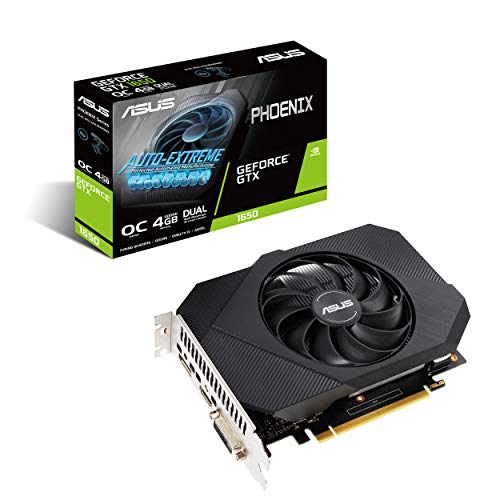
| ASUS Phoenix GeForce GTX 1650 OC Edition | A compact single-fan upgrade for an older desktop | 4GB GDDR6, PCIe 3.0, HDMI, DisplayPort, DVI-D |
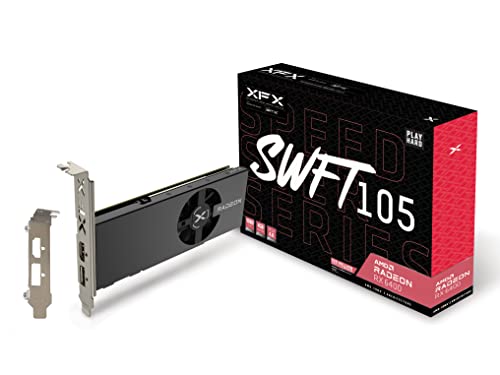
| XFX Speedster SWFT105 Radeon RX 6400 | A low-profile, slot-powered card for a small form factor case | 4GB GDDR6, AMD RDNA 2, PCIe 4.0, HDMI 2.1, DisplayPort 1.4a |
How to Choose
Match the card to your monitor, not to a wishlist
Start with the screen you already use, because it sets the workload. A 1080p monitor pairs naturally with a 4GB card, while a 1440p panel pushes the same memory much harder and forces lower texture settings in newer titles. Check the card’s outputs against the monitor’s inputs as well: one card here offers HDMI, DisplayPort, and DVI-D, while the other offers HDMI 2.1 and DisplayPort 1.4a with no DVI port. An older monitor with only DVI or VGA will need an adapter or a different card, so confirm the cable plan before checkout.
Check the power supply and the power connector
Budget cards differ in how they draw power, and that difference decides whether an upgrade is a ten-minute job or a full rebuild. Some 4GB cards take all their power from the motherboard slot and need no extra cable, which suits prebuilt desktops with modest power supplies. Others still expect a standard supply with headroom for the whole system. Open the case, read the wattage label on the supply, and count the spare PCIe power cables. A card that needs a connector you do not have is the wrong card, however good its specifications look.
Measure the case before you fall for a cooler
Length, height, and slot thickness matter more than brand at this size. A single-fan card around seven inches long fits cases where a dual-fan model will not, and a low-profile card fits slim desktops that a full-height card cannot enter at all. Measure from the rear bracket to the nearest obstruction, such as a drive cage or front fan, and check whether a second slot below the card is free. Also leave room for air: a card pressed against a solid panel or a neighbouring card will run hotter and louder than the same card in an open layout.
Treat 4GB as a ceiling, and set expectations accordingly
Four gigabytes of video memory is a hard limit, not a number that driver updates will raise. Games that stream large textures, high-resolution texture packs, and heavy multitasking with video editing timelines will hit that ceiling first. That does not make these cards useless; it makes settings choices part of the purchase. Expect to run newer titles at medium settings, keep texture quality one step below maximum, and close a browser full of video tabs while gaming. Buyers who accept that trade in advance are the ones who stay happy with a 4GB card.
The 2 Best Options
ASUS Phoenix GeForce GTX 1650 OC Edition
The Phoenix GTX 1650 OC Edition is the straightforward choice for an older desktop that needs a real graphics card without a rebuild. Its single Axial-tech fan and compact frame suit cases where a longer dual-fan card would foul a drive cage, and the mix of HDMI, DisplayPort, and DVI-D covers both modern and older monitors. As a factory-overclocked edition of the GTX 1650, it gives a modest lift over a reference-clocked card of the same chip, which shows up most clearly in older and esports titles at 1080p.
Specs
- Graphics processor: NVIDIA GeForce GTX 1650
- Video memory: 4GB GDDR6
- Memory clock speed: 1635 MHz
- Interface: PCIe 3.0
- Outputs: HDMI, DisplayPort, DVI-D
- Cooling: single Axial-tech fan
- Maximum display resolution: 7680 x 4320
- Card dimensions: 6.85 inches long by 4.96 inches wide
- Model number: PH-GTX1650-O4GD6
- Warranty: 3 Year Warranty
Best for: An older desktop that needs a compact, single-fan 1080p card with three different display outputs.
Watch out for: The single fan has less cooling headroom than a dual-fan design, so confirm the case has at least some intake airflow before fitting it into a cramped, unventilated chassis.
XFX Speedster SWFT105 Radeon RX 6400
The Speedster SWFT105 RX 6400 is built for the tightest cases in this guide. It is a low-profile, single-slot card that draws its power from the motherboard slot, so it suits slim office desktops and small form factor builds where there is no spare power cable and no room for a second slot. Its RDNA 2 architecture and 4GB of GDDR6 memory handle 1080p play in older and less demanding titles, and the HDMI 2.1 and DisplayPort 1.4a outputs cover a modern monitor without an adapter.
Specs
- Graphics processor: AMD Radeon RX 6400
- Video memory: 4GB GDDR6
- Architecture: AMD RDNA 2
- Stream processors: 768
- Boost clock: up to 2321 MHz
- Memory bus: 64-bit
- Interface: PCIe 4.0
- Outputs: HDMI 2.1, DisplayPort 1.4a
- Form factor: low-profile, single slot, single fan
- Model number: RX-64XL4SFG2
- Board power: 53 W
Best for: A slim or small form factor desktop with no spare power connector and only one free slot.
Watch out for: The single-slot cooler and narrow 64-bit memory bus leave little margin in demanding newer games, so keep texture settings modest and expect the small fan to work hard under sustained load.
Which One Fits Your Situation
You are upgrading an older office or prebuilt desktop
Choose the ASUS Phoenix GTX 1650 OC Edition. Its three outputs, including DVI-D, give you the best chance of connecting the monitor you already own without buying an adapter, and the compact single-fan frame fits most standard mid-tower and many smaller cases. It is the safer general upgrade when the case has a normal full-height slot and the monitor is not brand new.
Your case is slim, and there is no spare power cable
Choose the XFX Speedster SWFT105 RX 6400. The low-profile, single-slot design and slot-only power draw are the deciding features here, not raw speed. It is made for exactly the machines other cards cannot fit: slim desktops, small form factor builds, and office PCs with a modest power supply and no free PCIe power connector.
You play older games and esports titles at 1080p
Either card works, so let the case and the monitor decide. The GTX 1650 route suits a setup with an older monitor or a need for DVI, while the RX 6400 route suits a modern monitor with HDMI 2.1 or DisplayPort. Both handle the lighter end of the catalogue well at 1080p, and neither is the right pick for chasing maximum settings in the newest releases.
You want the simplest install possible
Pick the card whose outputs and size already match your machine, then check the driver situation. The RX 6400 needs no power cable at all, which makes its physical install the simplest of the two. The GTX 1650 needs a standard full-height slot and a free rear bracket, but its broader output mix means fewer surprises once the card is seated. Whichever you choose, download the current driver from the chip maker’s site rather than relying on the disc or download that shipped with the card.
Common Mistakes
- Buying a 4GB card for a 1440p monitor and expecting high texture settings in new games, when the memory ceiling will force compromises first.
- Ordering without measuring the case, then finding the card is too long, too tall, or blocked by a drive cage.
- Assuming every budget card needs no power cable; some do, and a prebuilt supply may not have the connector.
- Forgetting to check monitor inputs, especially with older DVI-only or VGA-only displays that a modern card cannot drive directly.
- Installing the card and skipping the driver update, then blaming the hardware for stutter that a current driver would have smoothed out.
Frequently Asked Questions
Is 4GB of video memory enough for gaming in 2026?
It is enough for 1080p gaming at medium settings in older and less demanding titles, and for esports games that are not texture-heavy. It is not enough for maximum texture settings in the newest releases, where the card will run out of memory before it runs out of raw speed. Set textures one step below maximum and the experience stays smooth.
Do these cards need an extra power connector?
The XFX Speedster SWFT105 RX 6400 draws its power from the motherboard slot and needs no extra connector. The ASUS Phoenix GTX 1650 OC Edition is also a compact, low-power design, but you should still check your power supply’s wattage and spare cables before ordering, because a tired prebuilt supply can cause instability even with a modest card.
Will a 4GB card work in an older PCIe 3.0 motherboard?
Yes. Both cards here use a PCIe interface that is backward compatible, so a PCIe 4.0 card will run in a PCIe 3.0 slot. The RX 6400 uses a narrower PCIe link, so the performance gap between a PCIe 3.0 and PCIe 4.0 slot is larger for that card than for most, which is worth knowing if your motherboard is several generations old.
Can I use a 4GB card for video editing or streaming?
Light work is fine: timeline playback at 1080p, hardware video output, and streaming less demanding games all sit comfortably within what these cards offer. Heavy 4K timelines, large effects stacks, and high-resolution texture work will hit the 4GB ceiling quickly. For that kind of work, a card with more memory is the honest upgrade, not a faster 4GB model.
What should I check first if a new card shows no display?
Reseat the card firmly in the slot, confirm the monitor cable is plugged into the graphics card and not the motherboard, and check that the monitor input matches the cable you used. If the screen stays dark, try a different output on the card, then a different cable. A card that lights up but shows nothing is usually a seating, cable, or input problem rather than a dead card.