Key takeaways
- Four 4-bay DAS enclosures for local project storage, compared from their Amazon listings on connection type, RAID approach and how each presents its drives.
Local project storage has a different problem from network storage. The files are not waiting for a whole office; they sit next to one machine, mid-job, while a project is built, rendered, revised and parked. When that work lives on a tangle of single external drives, the active project is on one disk, last month’s version is on another, and nobody is sure which cable belongs to which deadline. A four-bay enclosure that plugs straight into the workstation puts those versions in one box, on one connection.
The readers this shortlist serves are freelancers, small teams and home-office workers who keep work locally on purpose: the machine is here, the client files stay here, and no network sharing is wanted. Each enclosure below connects directly to a computer rather than joining a network, and each holds four drives according to its own Amazon listing. The differences that matter are the connection used, whether it offers hardware RAID or simply presents its drives, and how much fuss it asks for.
Quick Picks
As an Amazon Associate we earn from qualifying purchases.
| Product | Best for | Key spec from title |
|---|---|---|
| TERRAMASTER D4-320 External Hard Drive Enclosure | Straightforward local expansion on a modern USB-C desk | 4bay USB 3.2 Gen2 10Gbps Type-C USB Storage |
| QNAP TR-004 4 Bay USB Type-C Direct Attached Storage (DAS) | Local projects that want hardware RAID inside the box | Direct Attached Storage (DAS) with hardware RAID |
| OWC ThunderBay 4 Four-Bay Thunderbolt Storage Enclosure | Thunderbolt workstations that want RAID handled by software | Thunderbolt 40Gb/s RAID Storage Enclosure with SoftRAID Premium |
| Mediasonic PROBOX 4 Bay DAS (HF2-SU3S3) | Keeping four separate 3.5-inch SATA drives on USB 3.0 or eSATA | 4 Bay DAS 3.5-inch SATA, USB 3.0 eSATA |
How to Choose
Settle the Connection Before Anything Else
A direct-attached box can only move data as fast as the port it shares with the computer, and the four listings here do not share the same port. Two lean on USB-C connections, one is built around Thunderbolt, and one still offers USB 3.0 alongside eSATA. Look at the workstation first: which ports are free every day, not just present on the back panel, and which cable will stay plugged in while the project runs? A laptop docked through a single cable has different spare capacity from a tower with a row of empty sockets, and choosing the enclosure to fit the port that is genuinely available avoids a daily unplugging ritual.
Decide Whether RAID Belongs in the Box, in Software, or Nowhere
Four bays invite four separate decisions disguised as one. Hardware RAID inside the enclosure, as the QNAP listing states, lets the box present a combined volume while the computer stays out of the arrangement. Software RAID, named on the OWC listing through SoftRAID Premium, moves that job to the workstation and its software. The TerraMaster and Mediasonic listings take the simpler road: drives appear individually, and the owner manages copies between them. None of these is automatically safer. What matters is whether the person at the desk understands the arrangement well enough to recover calmly when a drive fails mid-project.
Think in Projects, Not in Total Capacity
Total capacity is the least useful number on a local storage box, because projects do not arrive in total; they arrive one client, one build, one deadline at a time. A tidier way to plan is one bay pattern: active work in one place, recent finished work in another, and a rotating copy that leaves the desk. Four bays support that pattern neatly, whether the drives are combined or kept separate. Before buying, sketch which bay or volume holds the live project, which holds the parked ones, and which holds the copy that gets swapped out, because an enclosure bought without that sketch tends to fill up as randomly as the single drives it replaced.
Check Drive Size and the Desk Itself
Listings differ on the drive size they are built for, and the Mediasonic title, for example, specifies 3.5-inch SATA drives, while a mixed drawer of salvaged laptop drives would not suit it. Confirm the drives already on hand against the listing before assuming they can move across. Then consider the physical desk: a four-bay box has a fan, a power supply and a preferred spot where its cable reaches without crossing the keyboard. Local storage gets handled, bumped and unplugged far more than a network box in a cupboard, so a stable home for it is part of the specification, even though no listing prints one.
The 4 Best Options
TERRAMASTER D4-320 External Hard Drive Enclosure

For a desk that simply needs more local room, quickly, the D4-320 keeps the proposition short. Its Amazon listing describes a four-bay enclosure on USB 3.2 Gen2 Type-C at 10Gbps, hot swappable and plug and play, sold diskless, and the listing copy calls it direct attached storage that supports up to four hard drives on that single connection. There is no RAID arrangement to learn, which suits a freelancer who keeps projects as separate folders on separate drives and copies finished work across by hand at the end of the week.
Specs
- Product name from listing: TERRAMASTER D4-320 External Hard Drive Enclosure
- Bays from listing: 4bay
- Connection from listing: USB 3.2 Gen2 10Gbps Type-C USB Storage
- Handling from listing: Hot Swappable, Plug and Play
- Storage described in listing: direct attached storage, support for up to four hard drives
- Supplied state: Diskless
Best for: A single workstation that needs four local drives on one modern USB-C connection, managed as separate disks.
Watch out for: The listing presents the drives individually rather than as a combined RAID volume, so anyone expecting the box itself to mirror or stripe drives should look at the RAID models below instead.
ASIN: B0CTTL9R7Z
QNAP TR-004 4 Bay USB Type-C Direct Attached Storage (DAS)

The TR-004 is the pick when the enclosure, not the computer, should handle how the four drives combine. Its listing title states the arrangement plainly: a four-bay USB Type-C direct attached storage unit with hardware RAID, sold diskless. That suits a small project team whose workstation changes more often than its storage, because the volume arrangement travels with the box rather than with one machine’s software setup. A finished project can sit on a protected volume while the live one keeps moving, and the same box can be carried to another desk without rebuilding the arrangement from scratch.
Specs
- Product name from listing: QNAP TR-004 4 Bay USB Type-C Direct Attached Storage (DAS) with hardware RAID (Diskless)
- Bays from listing: 4 Bay
- Connection from listing: USB Type-C
- Type from listing: Direct Attached Storage (DAS)
- Drive arrangement from listing: hardware RAID
- Supplied state: Diskless
Best for: Local project storage where the RAID arrangement should live inside the enclosure and stay put when the host computer changes.
Watch out for: Hardware RAID means the arrangement is set on the enclosure, so changing how the drives combine later is a deliberate, planned job rather than a casual setting to flip mid-project.
ASIN: B07K4RC7X9
OWC ThunderBay 4 Four-Bay Thunderbolt Storage Enclosure

Thunderbolt desks have their own logic, and the ThunderBay 4 is built for them. The Amazon listing names it a four-bay Thunderbolt storage enclosure at 40Gb/s, supplied at 0TB, meaning the buyer provides the drives, and bundled with SoftRAID Premium, which places the drive arrangement in software on the host machine. For a video-heavy project folder or a workstation that already lives on Thunderbolt docks and displays, that keeps storage on the same connection family as everything else on the desk, with the RAID decisions handled where the editing software already runs.
Specs
- Product name from listing: OWC ThunderBay 4 0TB Four-Bay Thunderbolt 40Gb/s RAID Storage Enclosure with SoftRAID Premium
- Bays from listing: Four-Bay
- Connection from listing: Thunderbolt, 40Gb/s
- Drive arrangement from listing: RAID Storage Enclosure, with SoftRAID Premium
- Supplied capacity from listing: 0TB
Best for: Thunderbolt-based workstations that want four local drives on the same connection family as their dock and displays, with software-managed RAID.
Watch out for: The RAID side depends on the included software running on the host, so a buyer who plans to move the box between very different machines should confirm the software arrangement suits that habit first.
ASIN: B079KR2JVM
Mediasonic PROBOX 4 Bay DAS (HF2-SU3S3)
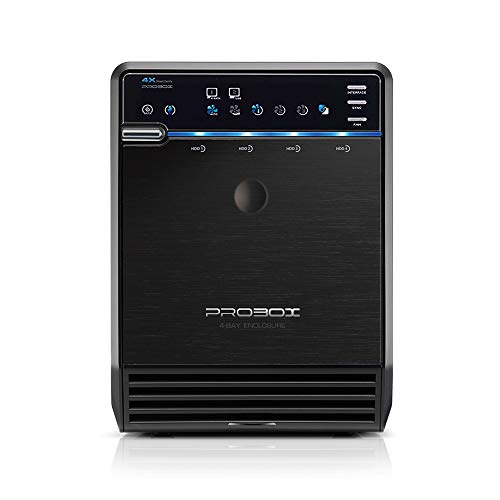
The ProBox is the oldest-fashioned option here, and for some desks that is precisely the appeal. Its listing describes a four-bay DAS for 3.5-inch SATA drives with two connection choices, USB 3.0 and eSATA, and a supported device quantity of four. A workstation that still has eSATA, or an owner with a shelf of full-size SATA drives to rehouse, gets a simple metal box that presents those drives locally without a network, an app or a RAID layer to configure. It is local storage in its most literal form: drives in, cable across, work saved.
Specs
- Product name from listing: Mediasonic PROBOX 4 Bay DAS 3.5-inch SATA Hard Drive Enclosure – USB 3.0 eSATA (HF2-SU3S3)
- Bays from listing: 4 Bay DAS
- Drive size from listing: 3.5-inch SATA
- Connections from listing: USB 3.0, eSATA
- Supported devices from listing: quantity 4
- Model from listing: HF2-SU3S3
Best for: Reusing full-size 3.5-inch SATA drives on a workstation that can use USB 3.0 or eSATA, kept as separate local volumes.
Watch out for: The connections named are older standards than the USB-C and Thunderbolt ports on the other listings, so a newer laptop with only USB-C sockets will need the connection question settled before this box makes sense.
ASIN: B09WPPJHSS
Which One Fits Your Situation
One Laptop, Several Active Projects, No Patience for Setup
Take the TERRAMASTER D4-320. Plug it into the USB-C port, drop in the drives, and the projects sit as separate disks that can be named after clients and swapped as work rotates. Its listing promises plug and play handling, and the absence of a RAID layer means there is nothing to configure before the first deadline. The discipline is manual, copying finished work across on a schedule, but the setup cost on day one is close to zero.
The Storage Stays, the Computer Changes
The QNAP TR-004 suits a desk where laptops come and go, or a small team that hands projects between machines. Because its listing places the RAID in the hardware, the combined volume arrives the same way on whichever computer connects next. That consistency matters when a project folder must look identical to whoever opens it, and when nobody wants to reinstall or reconfigure storage software each time the host machine is replaced or borrowed.
A Thunderbolt Editing Desk With Large Project Folders
Choose the OWC ThunderBay 4 when the workstation already runs on Thunderbolt and project folders are large enough that connection speed shapes the working day. Its listing pairs the 40Gb/s Thunderbolt connection with SoftRAID Premium, so the arrangement lives in software on the editing machine itself. Park finished projects on one volume, keep the live one close, and the box behaves like part of the workstation rather than an accessory attached to it.
A Shelf of Spare Full-Size Drives Needs a Home
The Mediasonic PROBOX turns spare 3.5-inch SATA drives into a working local store without buying into a new connection standard. A home office with an older tower, an eSATA port and drives left from previous machines can put all four to work as an archive of parked projects. It will not be the fastest box in this list, but for storage that is opened occasionally rather than edited from all day, rehousing drives already owned is a sensible economy.
Common Mistakes
- Buying a DAS enclosure for a job that actually needs several people connected at once, which is network storage territory.
- Assuming RAID of any kind removes the need for a separate copy of finished project work stored somewhere else.
- Filling the box with mixed, unlabelled drives and no record of which project lives on which disk or volume.
- Choosing by bay count while ignoring the port, then discovering the workstation has no matching socket free.
- Unplugging the enclosure mid-write to move it between machines, treating local storage like a removable stick.
Frequently Asked Questions
What makes a DAS different from a NAS for project work?
A DAS connects directly to one computer by cable, so the drives appear as local storage on that machine and nowhere else. A NAS joins the network and can be reached by several machines. For a single workstation keeping client projects close and off the network, the direct connection is simpler; for shared access, the network model is the right tool.
Should local project drives be combined with RAID or kept separate?
It depends on how the work is handled. Combined volumes suit one large project space that must stay available if a drive fails, while separate drives suit owners who rotate projects disk by disk and copy between them manually. Either way, keep a copy of finished work outside the enclosure, because a combined volume still lives in a single box on a single desk.
Can drives already in use move straight into a four-bay enclosure?
Drives can be installed physically when the size matches the listing, but setting up a new arrangement, especially any RAID arrangement, normally means the drive is prepared fresh and its contents erased. Copy the project files somewhere safe first, build the enclosure, then copy back. Treat any drive with the only copy of a project as unavailable for installation until that copy exists elsewhere.
How should four bays be organised for ongoing projects?
A pattern that holds up is one place for live work, one for recently finished projects awaiting delivery or sign-off, one for the parked archive, and one for the rotating copy that leaves the desk. The exact split matters less than writing it down and keeping it, so that anyone returning to a project months later can find its folder, its final version and its copy without guesswork.